
WhatsApp Chatbot Malaysia: Costs, Features, and How SMEs Can Launch in 2026
Compare WhatsApp chatbot costs, features, risks, and implementation steps before launching an AI assistant for your Malaysian SME.

A WhatsApp chatbot can answer routine questions, qualify leads, book appointments, and send complex cases to a Malaysian SME’s staff. Its cost goes beyond “the price of a bot.” A complete budget also covers the official WhatsApp Business Platform, message charges, implementation, knowledge-base preparation, integrations, monitoring, and ongoing updates.
For a first project, a well-defined workflow is usually more practical than a fully autonomous AI agent. That workflow might answer product FAQs, collect lead details, or confirm appointments. It should also have clear escalation rules and measurable outcomes.
Quick answer: The cost of a business-grade WhatsApp chatbot normally has four parts: platform or implementation fees, Meta message charges, AI/model usage, and support or maintenance. The appropriate setup depends on message volume, automation depth, integrations, languages, and the consequences of an incorrect answer.
What is a WhatsApp chatbot?
A WhatsApp chatbot is an automated assistant connected to a business’s WhatsApp channel. It responds to customer messages, presents options, retrieves approved information, collects structured details, triggers workflows, and passes conversations to staff when needed.
There are two broad types:
- Rule-based bots follow fixed menus, keywords, buttons, and decision trees.
- AI-assisted bots interpret natural-language questions and retrieve answers from approved business information before responding.
For most SMEs, a hybrid approach is safer. Structured flows handle sensitive actions such as refunds, payment changes, or appointment cancellations. AI retrieval can handle broader questions about products, services, policies, and operating hours.
Why Malaysian SMEs are considering WhatsApp automation
Many customers already use WhatsApp to ask about prices, stock, delivery, locations, opening hours, bookings, and after-sales support. A chatbot becomes useful when these questions keep recurring and slow responses cost sales or add unnecessary work for staff.
Common benefits include:
- Faster first responses outside office hours.
- More consistent answers based on approved information.
- Better lead capture before a prospect reaches sales.
- Reduced repetitive work for customer-service teams.
- Multilingual support across English, Bahasa Melayu, and Chinese.
- A searchable record of unanswered questions that shows where content or processes need improvement.
These benefits are not automatic. Results depend on the quality of the information, the workflow design, the handoff to staff, and the measurement plan.
AI chatbot vs traditional chatbot: what is the difference?
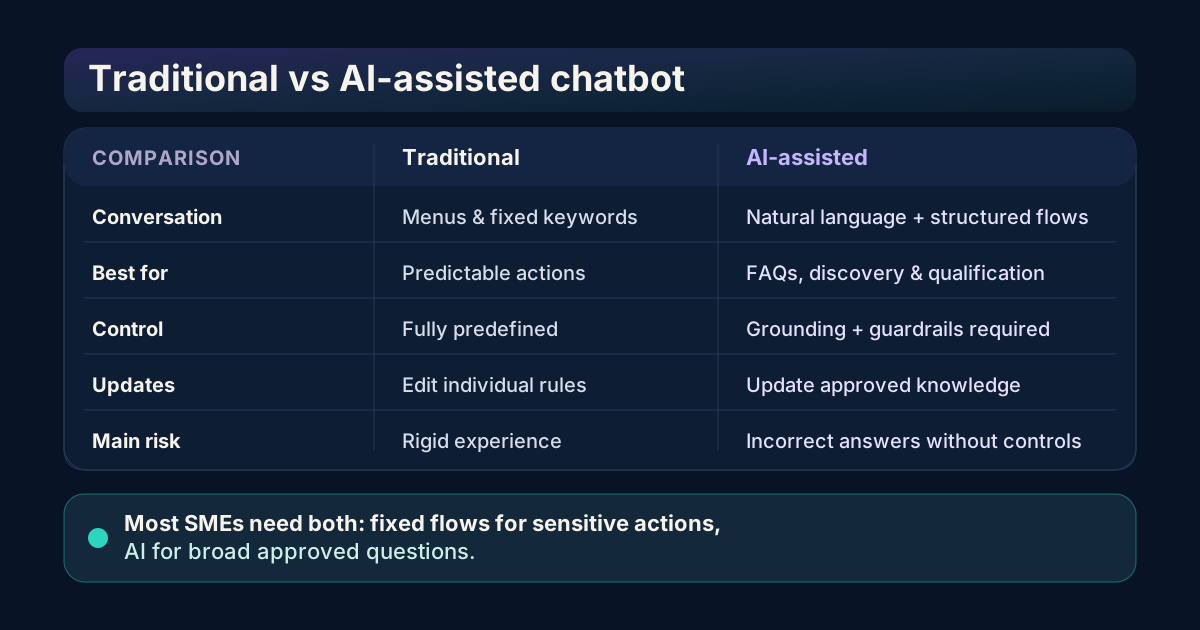
A traditional chatbot follows a predefined decision tree. It works well for predictable tasks such as selecting a department, checking opening hours, or choosing an appointment slot. Because the path is fixed, every response can be reviewed in advance.
An AI chatbot interprets natural-language questions and retrieves information from an approved knowledge base. Customers can ask about delivery, product suitability, or service requirements without knowing the exact keywords used in a menu flow.
| Capability | Traditional chatbot | AI-assisted chatbot |
|---|---|---|
| Conversation style | Buttons, menus, and fixed keywords | Natural-language questions plus structured flows |
| Best for | Simple, repeatable decisions | FAQs, product discovery, lead qualification, and knowledge retrieval |
| Control | Highly predictable | Requires grounding, guardrails, and review |
| Knowledge updates | Edit individual rules or answers | Update approved source content and retrieval indexes |
| Main risk | Rigid or frustrating user experience | Confident but incorrect answers if poorly configured |
| Recommended use | Low-risk, narrow workflows | Broader customer questions with clear escalation rules |
For most Malaysian SMEs, combining the two is the most practical approach. Sensitive transactions and approvals stay inside fixed workflows, while AI interprets questions and retrieves the appropriate approved answer.
Benefits by business function
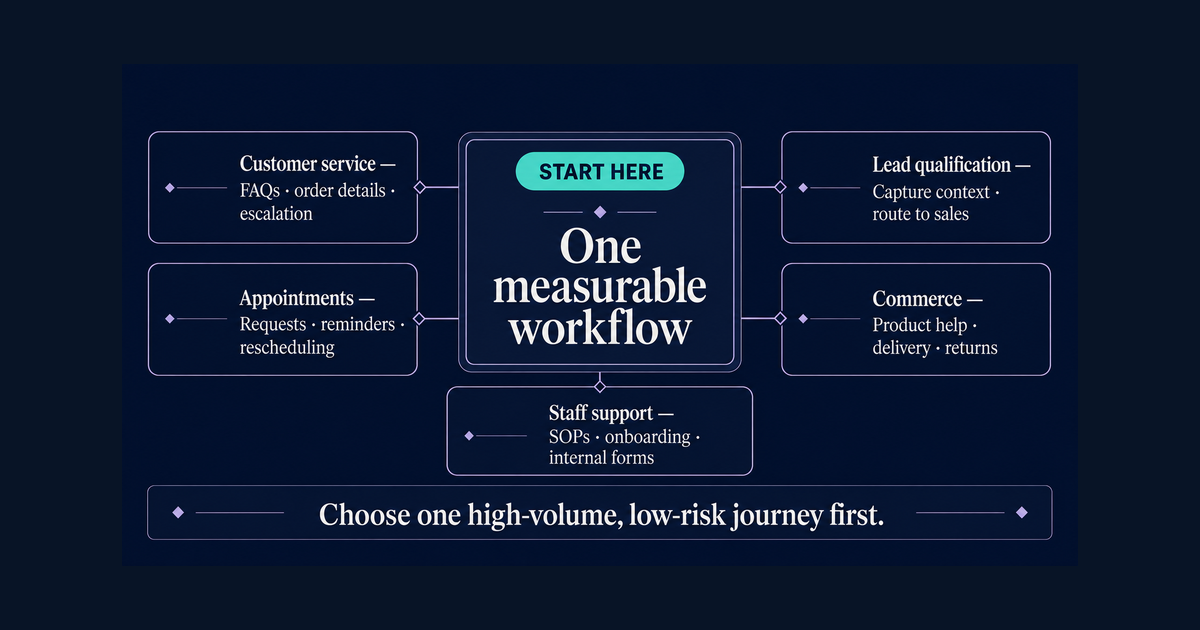
Customer service
A chatbot can answer recurring questions about opening hours, branch locations, delivery, warranty terms, product availability, and service policies. Before sending a complicated case to a staff member, it can collect the order number or customer details.
The number of answered messages says little on its own. More useful measures are the percentage of conversations resolved without an unnecessary handoff, time to first response, repeat contacts, and customer satisfaction after resolution.
Sales and lead qualification
Before sending an enquiry to a salesperson, the chatbot can collect some basic information:
- What product or service is the customer considering?
- Which location or market are they in?
- What is their timeline?
- How large is the project or team?
- Would they like a consultation, quotation, or demonstration?
The answers can go to the correct sales owner and be recorded in the CRM. The sales team then has context before speaking with the prospect and can more easily prioritise those showing high intent.
Appointments and bookings
Clinics, education providers, property teams, repair businesses, consultants, and other appointment-based organisations can use a chatbot to collect a customer’s preferred date, service type, and contact details. With the right integration, the chatbot can show available slots, confirm bookings, send reminders, and support rescheduling.
Cancellation rules, payment requirements, and sensitive customer decisions should require explicit confirmation and, where appropriate, human review. Connecting a calendar does not mean every business decision should be automated.
E-commerce and conversational commerce
A WhatsApp chatbot can help shoppers find products, understand specifications and delivery options, and move to a checkout or payment flow. After a purchase, it can also answer questions about order status, returns, exchanges, and warranty claims.
Product recommendations need current catalogue information. When stock, prices, promotions, or delivery coverage change frequently, the chatbot should connect to a reliable source instead of depending on a static document that may become outdated.
Internal operations and staff support
The same conversational system can answer employees’ questions about SOPs, leave procedures, onboarding, internal forms, and company policies. This can be a useful second phase because the business controls the information and does not need to expose customer data in the workflow.
Unanswered employee questions can reveal gaps in the documentation. Over time, an internal assistant can function as a practical knowledge-management system as well as a customer-facing FAQ tool.
What does a WhatsApp chatbot cost in Malaysia?
There is no standard price for a “WhatsApp chatbot.” The term may refer to a basic FAQ flow or to a multilingual assistant integrated with a CRM and ERP.
1. One-time setup or implementation
Implementation work may include:
- Business and use-case discovery
- WhatsApp Business Platform setup
- Conversation design
- Knowledge-base cleaning and preparation
- AI or rules configuration
- CRM, calendar, helpdesk, or ERP integration
- Testing, staff training, and launch support
A simple FAQ bot requires far less work than one that qualifies leads, checks inventory, creates tickets, books appointments, and writes records into another system. When comparing providers, ask them to separate fixed implementation work from recurring fees.
2. Meta message charges
Meta’s WhatsApp Business Platform charges depend on the recipient’s market and the message category. Charges are based on delivered messages. Current categories include marketing, utility, authentication, and service. Because rates can change, check the official WhatsApp Business Platform pricing page as the source of truth.
Your monthly estimate should distinguish between:
- Customer-initiated service conversations
- Business-initiated marketing messages
- Utility notifications such as confirmations or updates
- Authentication messages
- Promotional campaigns and broadcasts
Any fixed “all-in” monthly price should state what it includes and which Meta rates the calculation uses.
3. AI and software usage
An AI chatbot may incur additional costs for:
- Model or token usage
- Knowledge-base retrieval
- Conversation storage
- Analytics
- Human-agent inboxes
- Contact management
- Media processing
- Transcription or translation
Conversation volume and message length usually affect these costs more than the number of contacts in the database.
4. Maintenance and optimisation
Business information changes over time, including prices, product availability, opening hours, policies, promotions, and staff procedures. Ongoing support may therefore include:
- Knowledge-base updates
- Failed-answer reviews
- Prompt and workflow improvements
- New templates
- Analytics reviews
- Security and access management
- New integrations and languages
A low initial quote may become expensive when every change requires a separate custom development project. Ask how the provider handles updates after launch.
Which features should an SME prioritise?
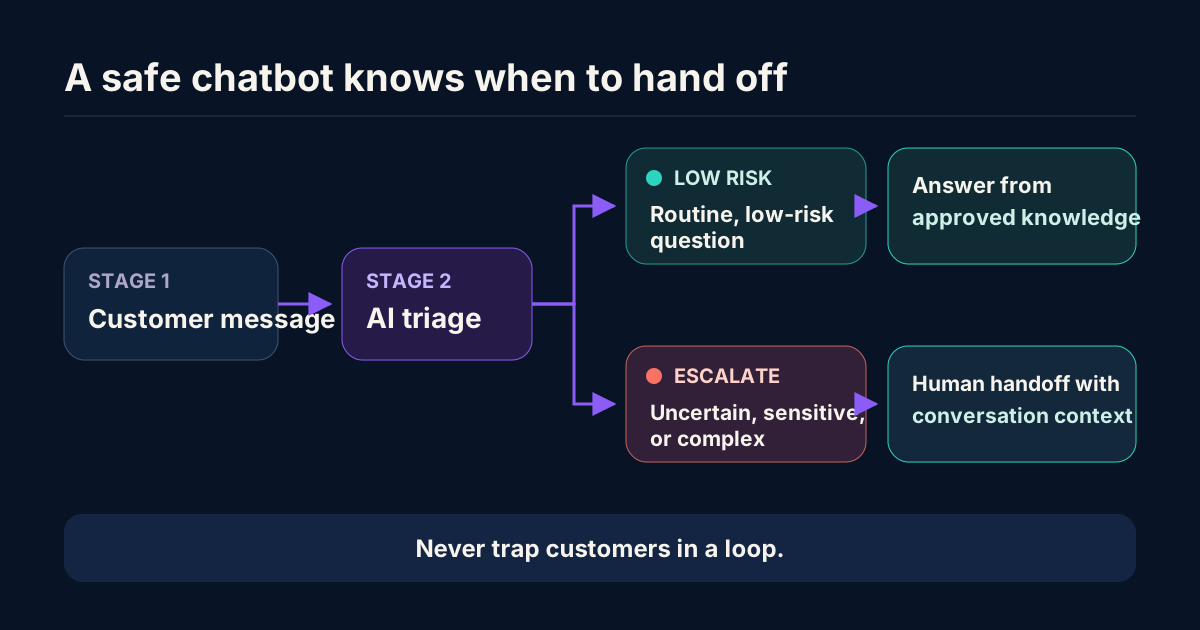
Prioritise features that address a measurable business problem.
Essential features
- Official WhatsApp Business Platform connection
- Human handoff with conversation context
- Business-hours and out-of-hours routing
- Approved FAQ or knowledge-base answers
- Conversation logs and basic analytics
- Opt-in and opt-out handling
- Role-based access for staff
- Clear fallback responses when the bot is uncertain
High-value workflow features
- Lead qualification
- Product or service recommendations
- Appointment booking and reminders
- Order or delivery-status lookup
- Ticket creation
- CRM synchronisation
- Customer segmentation
- Multilingual replies
- Click-to-WhatsApp campaign tracking
Features to delay until the basics work
- Complex autonomous decision-making
- Large-scale outbound campaigns
- Sensitive financial or medical advice
- Unsupervised refunds or account changes
- Too many integrations at once
- Voice or image interpretation without a clear business case
How to choose a WhatsApp chatbot provider
Define the first workflow and its success metric before comparing vendors. Use the following questions to assess each provider.
Is the connection official?
Confirm that the provider uses the official WhatsApp Business Platform. Also establish which business account owns the phone number, assets, templates, and conversation data.
Solutions that depend on unofficial QR-session methods or reverse-engineered WhatsApp Web automation carry account, access, and platform risks. Understand those risks before placing a core customer channel with a vendor.
Who owns the account and data?
Confirm that your organisation controls:
- The WhatsApp Business Account
- The phone number
- Business Manager access
- Message templates
- Exportable conversation data
- Knowledge-base files
- Analytics and reporting
The provider’s documentation should cover data retention, subprocessors, model providers, access controls, and deletion procedures.
What happens when the bot is unsure?
When the system is unsure, it should say so rather than produce a confident answer. Ask the provider to show you:
- The fallback answer
- The confidence or uncertainty approach
- Blocked topics
- Human escalation rules
- Staff notification method
- Conversation history passed to the human agent
How are updates managed?
Find out who updates product information, policies, prices, and FAQs. Check how those changes are approved and how long they take to appear in production.
What will you measure?
At minimum, track:
- First-response time
- Resolution or containment rate
- Human handoff rate
- Unanswered-question rate
- Qualified leads
- Bookings completed
- Customer satisfaction
- Cost per resolved conversation
- Conversion rate for chatbot-assisted leads
A practical four-week launch plan
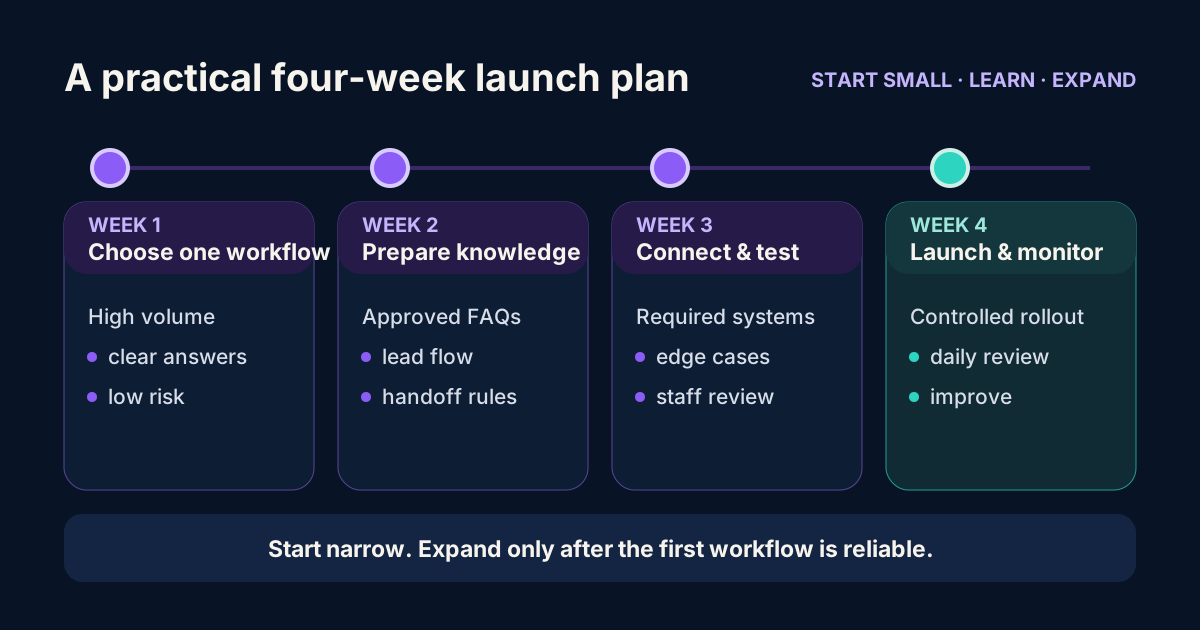
Week 1: Choose one workflow
Review the last 100–200 customer conversations, then group them by topic. Choose one high-volume, low-risk workflow with clear answers.
Good starting examples:
- Product and service FAQs
- Lead qualification
- Appointment requests
- Delivery and operating-hours questions
Document what the chatbot must do, what it must not do, and the point at which it must transfer a conversation.
Week 2: Prepare the knowledge and conversation flows
Gather approved information from the website, SOPs, product catalogues, pricing sheets, and customer-service answers. Remove duplicate and outdated material before using it.
Create separate flows for:
- Frequently asked questions
- Lead capture
- Human handoff
- Complaints
- Sensitive or restricted requests
- Out-of-hours messages
Week 3: Connect systems and test edge cases
For the first workflow, connect only the systems it requires. Testing should cover spelling mistakes, mixed languages, incomplete questions, angry customers, unsupported requests, and attempts to access information the user is not authorised to see.
Before launch, have staff review realistic conversations. A successful demonstration does not prove that a workflow is safe for production.
Week 4: Launch with monitoring
Launch to a controlled audience or limit the initial use cases. During the first week, review unanswered questions each day. Improve the knowledge base and escalation rules before automating more work.
After the first month, compare the results with the baseline recorded before launch.
WhatsApp chatbot compliance and trust checklist
This operational checklist is not legal advice. Malaysian businesses should seek professional advice based on their data flows and sector requirements.
- Tell customers when they are interacting with an AI assistant.
- Provide a clear way to reach a human.
- Collect only the information required for the stated purpose.
- Explain how personal data is used and retained.
- Record marketing opt-ins and honour opt-outs.
- Restrict staff access to conversation data.
- Review cross-border processing and vendor arrangements.
- Use approved retention and deletion procedures.
- Avoid exposing one customer’s information to another customer.
- Keep audit logs for workflow actions and administrative changes.
- Review sector-specific obligations before handling health, financial, identity, or other sensitive information.
For current requirements, consult the Malaysia Department of Personal Data Protection and obtain advice appropriate to your business.
How to calculate whether the project is worthwhile
Use a conservative model. An automated conversation does not always translate into saved labour.
Estimated monthly benefit =
- productive staff hours released × realistic hourly value
- plus incremental gross profit from qualified or recovered leads
- minus implementation amortisation
- minus platform, Meta, AI, and support costs
Start by measuring the number of repetitive conversations handled each week, the time spent on each one, and the percentage that can be automated safely. Measure chatbot-assisted lead conversion separately.
An appropriate early success criterion may be “fewer missed enquiries with the same team” rather than an immediate reduction in headcount.
Common mistakes to avoid
Buying features before defining a workflow
A long feature list does not guarantee business value. Begin with one measurable problem.
Treating AI as a replacement for approved information
AI does not remove the need for accurate source material, clear ownership, reviews, and update procedures.
Ignoring human handoff
When an issue is emotional, unusual, sensitive, or outside the bot’s scope, the customer needs a clear path to a staff member.
Using unsupported performance claims
Claims about a specific conversion lift or cost reduction need a baseline, a measurement period, and a clearly defined methodology.
Forgetting exit rights
Confirm that the business can export its data, transfer the phone number, access the account, and continue operating after the vendor relationship ends.
Final recommendation
For most Malaysian SMEs, a sensible starting point is a focused WhatsApp chatbot for one repetitive workflow. It should use the official WhatsApp Business Platform, rely on approved business knowledge, provide clear human escalation, and report results through a simple measurement dashboard.
Once that workflow is reliable, the business can expand into lead qualification, bookings, customer reactivation, CRM updates, and multilingual journeys. The chatbot does not need to sound clever. It needs to make a specific customer journey faster and clearer while making the work easier for the team to manage.
Book an AI chatbot consultation with QuantumFlare AI to map your first workflow, estimate the total cost, and define the measurement plan before implementation.